Subscribe to join thousands of other ecommerce experts
Article last updated 2026-01-28, 10:48 a.m.
While Performance Max drives volume, running Standard Shopping alongside it creates a powerful hybrid strategy that regains control over algorithmic blind spots like “zombie” inventory and rising brand CPCs. This “muscle and scalpel” approach allows you to use PMax for scale while deploying Standard Shopping to surgically protect margins and clear seasonal stock. To execute this without operational burnout, success relies on using automated orchestration to dynamically route products to the right campaign type based on real-time business data. This isn't just theory—it is a battle-tested blueprint we at smec derived from managing over €500 million in annual ad spend for 350+ global retailers.
For the vast majority of retailers, Google’s Performance Max has become their default Google Ads engine. And for good reason: For the most part, it works.
But in the past months, we’ve noticed a clear trend among marketers who have spent the last few years going “PMax-only”: They are starting to run Standard Shopping campaigns alongside it.
To be clear, these marketers aren’t replacing their Performance Max setup with Standard Shopping. Instead, they are now using it strategically to enhance PMax. Using Standard Shopping as a precision tool to cover very specific blind spots where Performance Max sometimes struggles.
This strategic shift is called a Hybrid Setup – where PMax does the heavy lifting, and Standard Shopping takes over where PMax falls short.
So the question is: Should you be doing it?
| Hybrid Strategy | Best For | Pros | Cons |
|---|---|---|---|
| 1. The “Zombie” Resurrection | Large catalogs with products receiving <10 clicks per month. | Revives dead inventory without wasting PMax budget. | Requires manual segmentation (unless using specialized software). |
| 2. The “Brand” Guardian | Retailers who want to minimize CPC on branded terms. | Lower CPCs and exact query control. | If you are missing a negative keyword, PMax might start cannibalizing the traffic again. |
| 3. The “Margin” Defender | Catalogs with extreme variance in profit margins. | Prevents PMax from overspending on low-margin items. | Limits the “discovery” reach of PMax. |
| 4. The “Clearance” Liquidation | Seasonal or end-of-life stock. | Forces the budget to focus on excess inventory. | High manual management required (without automation). |
| 5. The “Feed-Only” Catch-All | Large catalogs with low bids. | Captures cheap, long-tail traffic PMax ignores. | Requires frequent bid management. |
Table of Contents
What is a Standard Shopping &
Performance Max hybrid strategy?
A Hybrid Shopping Strategy means running Standard Shopping and Performance Max side-by-side to balance algorithmic reach with manual precision.
But let’s be clear: Most retailers probably don’t need a hybrid strategy. If your account is performing well and your inventory is moving efficiently, adding complexity might just be busy work.
Performance Max has matured into a highly efficient campaign type that covers most ground at an unprecedented scale across Google’s entire ad inventory.
However: Given the highly automated nature of Performance Max, there are specific edge cases we’ll outline below, where coupling PMax’s efficiency at scale with Standard Shopping’s granular level of control can be beneficial.

How we know this works
We aren’t guessing here. These insights come from managing over €500 million in annual ad spend for more than 350 global retailers.
We have spent 18 years optimizing complex accounts, and we’ve tested these hybrid setups in the wild. Our analysis confirms exactly what Google’s documentation now states: PMax no longer holds absolute priority.
Because PMax and Standard Shopping now compete on a fair playing field (Ad Rank), you finally have the leverage to influence the auction. We evaluated these strategies based on Control, Transparency, and Profit Impact to ensure they actually move the needle.
5 ways to run a hybrid Standard Shopping & Performance Max setup
1. The “Zombie” Resurrection
Best for: Large catalogs with longtail-products receiving <10 clicks per month.
Overview
Here is the problem with PMax: It creates a self-fulfilling prophecy. PMax relies on data to make decisions:
- If a product has no conversion history (like a new item or a niche SKU), the algorithm perceives it as “risky.”
- Because it looks risky, PMax doesn’t spend money on it.
- Because it doesn’t spend money, the product doesn’t receive the data to train the algorithm..
This cycle creates “Zombies”. Products that sit in your feed, rarely (if ever) getting a single impression because PMax is busy dumping 80% of your budget into your top 10 “Hero” products that it knows will convert.
The “Zombie” Resurrection strategy breaks this cycle. By pulling these products out of PMax and into a Standard Shopping campaign with a “Maximize Clicks” bid strategy, you are effectively paying to force the system to test them.
You aren’t asking for ROAS yet; you are buying the initial data (or “data density”) to prove to the algorithm that these products are alive.
Key Features
- Zero-impression filtering: Targets only SKUs that have zero visibility in PMax.
- Maximize Clicks bidding: Tells Google, “I don’t care about history, just push this product.”
Pros & Cons
- Pros:
- Unlocks revenue from longtail inventory.
- Prevents PMax from cannibalizing budget.
- Validates new products quickly.
- Cons:
- The “Re-Entry” problem. Once a zombie product “wakes up” and gets data, it must be moved back into PMax to scale. Doing this manually requires daily analysis of thousands of SKUs. If you miss a day, you are wasting ad spend on a strategy that has already done its job.

2. The “Brand” Guardian
Best for: Retailers who want to minimize CPC on branded terms.
Overview
PMax loves your brand traffic. In fact, it relies on it.
If you look at your PMax insights, you will often find that a huge chunk of your “efficiency” comes from people searching for your exact store name. The problem? These customers know your brand and are likely going to buy from you anyway.
The Trap: When you let PMax bid on your brand using Smart Bidding (tROAS), it will bid aggressively to secure that conversion because it helps the campaign hit its average target. You might end up paying $1.50 for a click that you could have bought for $0.20 simply because the automated bidding system is incentivized to secure the conversion at any cost within your target, rather than finding the cheapest possible price.
The “Brand” Guardian strategy removes these easy wins from PMax. By excluding your brand from PMax (using brand lists) and targeting it in Standard Shopping with Manual CPC, you can set a hard cap on what you are willing to pay.
Key Features
- Query-level transparency: You can see exactly which branded terms trigger ads (no more guessing what “Brand” means to Google).
- Exact bidding: You set the price. If you know a brand click is worth $0.50, you bid $0.50.
Pros & Cons
- Pros:
- Significantly lowers Brand CPC.
- Prevents competitors from poaching traffic.
- Cons:
- Potentially lower Conversion Volume: PMax uses conversion data to learn about your customers. By stripping out brand traffic (which converts highly), you are removing “easy wins” from the algorithm’s data pool. This can make it harder for PMax to exit the learning phase or hit aggressive ROAS targets, especially in smaller accounts.
3. The “Margin” Defender
Best for: Catalogs with significant variance in profit margins.
Overview
ROAS doesn’t tell you the whole truth. Performance Max is built to maximize revenue, not profit. It treats $500 in sales from a low-margin product exactly the same as $500 in sales from a high-margin luxury item.
The problem with PMax is its profit-blindness. If the easiest path to your revenue target is selling high volumes of low-margin goods, PMax will dump your budget there—potentially starving your high-margin inventory that could be more profitable if the algorithm were willing to bid more aggressively for it.
The “Margin” Defender strategy protects your bottom line. By isolating your low-margin items into a Standard Shopping setup, you can set tighter manual bid limits to prevent overspending. This keeps your high-margin “winners” in PMax to benefit from its scale, while ensuring your low-margin “fillers” don’t eat up budget with expensive, low-value clicks or excessive retargeting touchpoints.
Key Features
- Profit-based bidding: Aligns bids with actual margin contribution, ensuring you don’t lose auctions for your most valuable products just because they have a lower conversion rate.
Pros & Cons
- Pros:
- Profit-Based Bidding: Aligns bids with actual margin contribution, ensuring you don’t lose auctions for your most valuable products just because they have a lower conversion rate.
- Cons:
- Data Fragmentation. By pulling your best products out of PMax, you are effectively “starving” the algorithm of its best data signals, which can hurt the performance of your remaining items. Furthermore, manually calculating bid modifiers for thousands of SKUs based on fluctuating margins is mathematically complex and prone to human error.
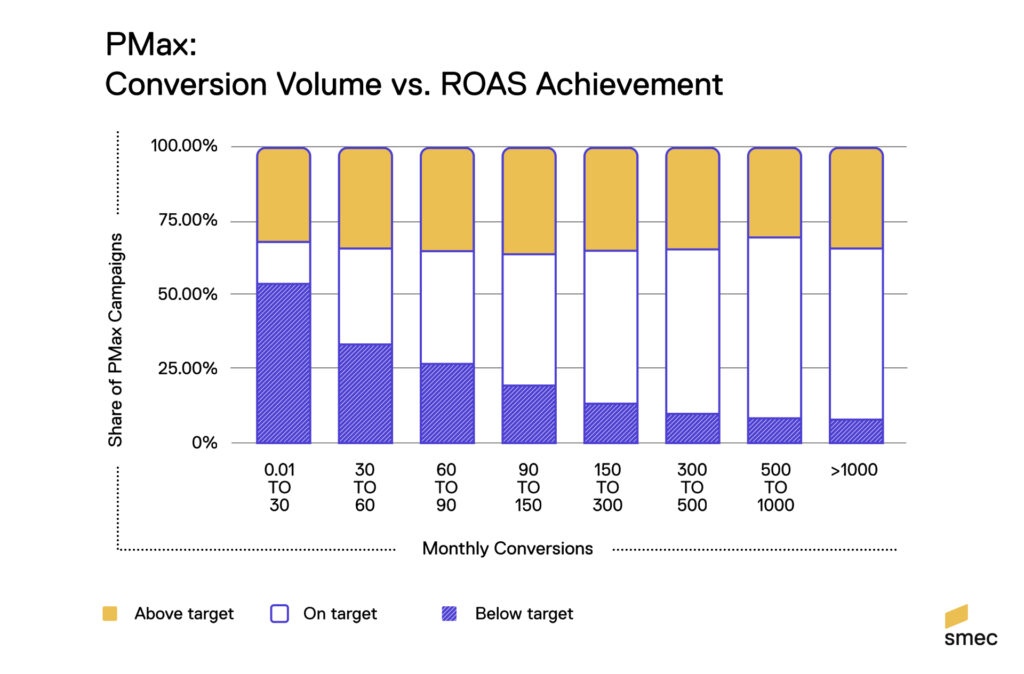
PMax campaigns with insufficient data struggle to hit their targets. When left to its own volition, PMax leaves you no control over which products are served, nor where and how aggressively.
Mike Ryan, Head of Ecommerce Insights
4. The “Clearance” Liquidation
Best for: Seasonal sales and end-of-life product lines.
Overview
AI is a historian. It looks at what worked yesterday to decide what to do today. This is great for evergreen products, but it is terrible for clearance.
The Trap: Imagine you have 500 winter coats you need to sell in March. You drop the price, but PMax looks at its historical data and says, “Winter coats don’t sell in March.” So, it stops bidding. Why? Because PMax optimizes for future probability based on past performance. Since these items have no future (they are going away), the algorithm hates them. It thinks it’s doing you a favor by being efficient.
The “Clearance” Liquidation strategy overrides this “smart” logic. By putting these items in a Standard Shopping campaign with aggressive manual bids, you basically scream at the algorithm: “I don’t care about history, sell this NOW.” You are prioritizing liquidity over efficiency.
Key Features
- High Priority setting: This is a forceful override. It tells Google to serve this campaign before your PMax or other Shopping campaigns (Standard Shopping priority settings still function alongside PMax Ad Rank).
- Aggressive Manual CPC: Bypasses the “learning phase.” You don’t need the algorithm to learn; you need it to spend.
Pros & Cons
- Pros:
- Perfect for short-term sales cycles.
- No learning period required.
- Cons:
- Speed mismatch. Clearance sales happen fast. Managing this manually is often too slow. If you forget to pause the campaign when stock runs out, you burn cash on clicks for out-of-stock items. If you launch it a day late, you miss the seasonal window.
5. The “Feed-Only” Catch-All
Best for: Capturing long-tail search queries at low cost.
Overview
PMax is a snob. It wants high-probability, high-intent auctions. It creates a “threshold” for bidding. If a search query is too specific, or has too low of a predicted conversion rate, PMax might not even bother entering the auction.
The Trap: While those queries are low probability individually, collectively they represent a massive amount of “cheap” traffic. These are the 5-word specific searches that cost pennies but still convert occasionally.
The “Feed-Only” Catch-All acts as a dumpster diver for profitable clicks. You set up a Standard Shopping campaign with Low Priority and very low bids (e.g., $0.15). It sits at the bottom of your account structure. When PMax passes on an auction, this campaign catches it. It’s a low-risk, pure-profit safety net.
Key Features
- Low Priority Setting: Ensures it only serves when PMax (and your other campaigns) don’t want the auction.
- Broad Inventory Coverage: Includes all eligible products as a backup.
Pros & Cons
- Pros:
- Captures additional revenue.
- Extremely low CPCs.
- Maximizes total query coverag.
- Cons:
- Reporting Black Hole: Because these conversions happen in a separate campaign, your “Blended ROAS” becomes trickier to track. You end up with fragmented data in Google Ads, requiring you to manually aggregate performance across campaigns to understand if your overall strategy is actually profitable.
How to choose the right strategy
- Got thousands of inactive SKUs? Prioritize the “Zombie” Resurrection.
- Brand CPCs rising? Implement the “Brand” Guardian immediately.
- Profit margins varying wildly? Deploy the “Margin” Defender.
- Need to sell old stock this week? Go for the “Clearance” Liquidation.
- Missing out on cheap long-tail traffic? Set up the “Feed-Only” Catch-All.
Why not run Performance Max alone?
Let’s be clear: Performance Max is an incredible engine. For 90% of your catalog – your steady sellers, your core inventory – it’s arguably the best engine Google has ever built. It finds volume and scales across channels in ways manual campaigns simply can’t match.
However, even the best engine has blind spots.
PMax excels at maximizing revenue from products with good data. But it struggles at the waking up dead products, clearing stock now, or protecting ultra-high margins.
The problem isn’t that PMax is “bad.” It’s singularly focused on efficiency. If you rely only on PMax, you are forced to accept its blind spots as the cost of doing business.
A hybrid architecture gives you overarching control: You let PMax handle the heavy lifting (scale and optimize), while utilizing Standard Shopping to handle the exceptions that PMax ignores.
Why not just run Standard Shopping alone?
In 2026, with Google’s heavy investment in AI, we wouldn’t recommend relying entirely on Standard Shopping for your Google Ads campaigns.
It’s tempting to lean on the manual control Standard Shopping offers, but choosing it exclusively comes with significant downsides. While you gain granular bid control, you sacrifice the immense scale and cross-channel reach of Google’s AI ecosystem.
In an era where shoppers bounce between YouTube, Discover, Gmail, Maps, and Search seamlessly, Standard Shopping is too siloed to compete as your primary growth engine. You are effectively missing out on the vast inventory PMax accesses to find customers before they even search.
Our advice: While Standard Shopping gives you levers to pull, it lacks the horsepower of the PMax engine. Use Standard Shopping as a tactical strike – perfect for isolating problems – but let PMax be your strategic workhorse for driving mass volume.
Should you run a Hybrid Shopping & PMax-Setup?
While PMax is the best engine for most retailers, a hybrid setup makes absolute sense for large accounts (typically 1k+ items) that require a higher level of granular control.
But to be crystal clear: Do not do this just because you can.
Ideally, you want to consolidate as much data as possible into PMax to fuel the AI. Splintering your account into hybrid campaigns should only be done when you hit a steep wall that PMax cannot climb.
To be sure, there are inherent problems within Google’s algorithm that require an unfeasible amount of manual optimization to fix:
- PMax cannot easily prioritize products with zero history without significant manual intervention (The Zombie problem).
- PMax cannot easily ignore its 30-day learning window for a 3-day sale without breaking the algorithm’s rhythm (The Clearance problem).
If you have very specific edge cases, going hybrid is a sensible strategy. But keep in mind that the amount of manual labor required is a sheer headache that opens up several points for potential failure.
Since we very much believe in the idea of having your cake and eating it, too, we have baked hybrid functionalities right into our software.
How to run a hybrid Google Ads
strategy with dedicated software
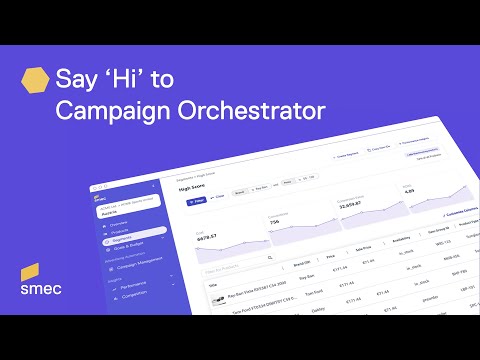
smec’s Campaign Orchestrator doesn’t just “connect” your campaigns. It acts as a unified brain that sits above them. Instead of managing PMax and Standard Shopping in silos, our platform orchestrates them together:
- It uses PMax for scale (90% of your account) where data is rich and volume is the goal.
- It deploys Standard Shopping for precision (10% of your account) only when you need to force visibility, protect specific margins, or clear stock instantly.
By connecting your PMax and Standard Shopping campaigns to smec’s Campaign Orchestrator, you can automate these complex strategies without the manual headache:
- Eliminate double-serving: We use Dynamic Segments that act as mutually exclusive buckets. A product physically cannot exist in two conflicting strategies at once. This solves the #1 risk of hybrid setups: accidental self-competition.
- Unified AI budgeting: Stop guessing. Our AI analyzes PMax and Standard Shopping together, dynamically shifting budget to wherever generates the most total profit. It balances PMax’s reach with Standard Shopping’s control in real-time.
- Cross-campaign automation: Your strategy isn’t trapped in a campaign. You set the goal (e.g., “Revive Zombies”), and our system handles the execution. As soon as a product wakes up, it automatically graduates to PMax. No spreadsheets, no manual moves.
- Uninterrupted data history: Because our insights sit above the ad platform, you keep your performance history even when products move between campaign types. No more reporting black holes when you shift strategy.
Result: You get the surgical precision of a hybrid setup, without the operational nightmare.
Conclusion: Don’t choose
between scale and control
Long story short: Before you dive into the deep, dark waters of Hybrid campaigns strategies, we generally recommend that you master PMax first. You’ll be surprised by just how capable this powerful campaign type really is on its own.
That being said, if you have very specific needs that PMax doesn’t cover for you, you no longer need to choose one campaign type over the other. You can have both:
- PMax is your muscle. It drives growth, finds new customers, and scales revenue across the entire Google ecosystem.
- Standard Shopping is your scalpel. It carves out profit, protects your brand, and moves dead stock when the algorithm gets lazy.
Running them together gives you full-spectrum control. But: Managing both of them manually is a recipe for burnout.
Ready to stop fighting the algorithm and start orchestrating it?
smec’s Campaign Orchestrator acts as your command center, seamlessly integrating PMax’s power with Standard Shopping’s precision.
We help you deploy the right campaign type for the right product at the right time – fully automated with precision.
Let’s work on your hybrid strategy together →
FAQ
Yes. Google has officially confirmed that PMax and Standard Shopping now compete based on Ad Rank. This means you can run them simultaneously without PMax automatically cannibalizing all traffic.
No, not anymore. As of late 2024, the campaign with the highest Ad Rank (Bid x Quality Score) wins the impression.
No. Google Ads functions on a second-price auction. You do not bid against yourself. You only pay the minimum amount required to beat the external competitor.
Typically, we see a 70/30 or 80/20 split. PMax drives the volume (70-80%), while Standard Shopping (20-30%) handles strategic tasks like clearance or margin protection.
For “Margin Defender,” yes. For “Zombie Resurrection” or “Clearance,” no. Use Manual CPC or Maximize Clicks. These products lack the historical data needed for Smart Bidding to function.
Ad Rank alone isn’t enough. You must strictly apply Negative Keywords to your PMax campaign via Account-Level lists or by contacting Google Support.
It won’t reset the campaign, but the specific products will lose their history in the context of PMax. This is actually a good thing. By removing “Zombies,” you are “purifying” the data signal for your remaining Hero products.
Once it gathers statistically significant data (e.g., >50 clicks or recent conversions). Tracking this manually is a nightmare; smec’s Campaign Orchestrator automates this lifecycle for you.
Without automation, expect your workload to increase by 30-50%. This is why we recommend automating the execution layer so you can focus on strategy.