Subscribe to join thousands of other ecommerce experts
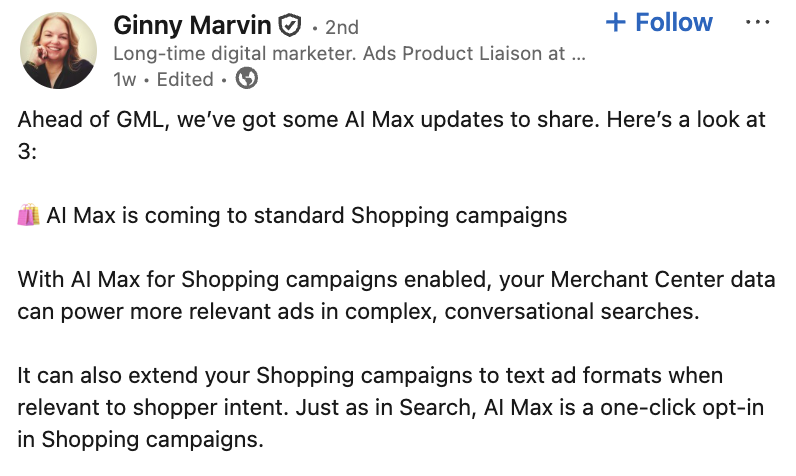
Ahead of GML, Google’s Ads Product Liaison Ginny Marvin recently made an announcement on LinkedIn that took us off guard:
AI Max will officially roll out to Standard Shopping.
Ginny Marvin
But wait a minute: AI-optimized Standard Shopping campaigns? Isn’t that essentially what feed-only Performance Max already does?
Well, yes. Sorta. And if you’d like testing it, we’ll be providing you with the definitive checklist on how to do it (without blowing your campaigns up.)
Table of Contents
AI Max for Google Shopping: Who is it for (and what’s the point?)
If you’ve been in the game long enough, you know we’ve officially gone full circle.
Back in 2018, Google introduced Smart Shopping. In 2022, they killed it to feed the Performance Max beast. Then we got “Performance Max for Search,” which morphed into “Search Max,” and then finally “AI Max for Search.”
And now? The AI Max layer (read: the PMax layer) is being slapped right back onto your Standard Shopping campaigns.
With more and more PMax features being introduced into the rest of Google’s ads-lineup, it begs the question: Where does this leave Performance Max?
Feed-Only PMax: An uncomfortable truth
If there is one thing that should be said about AI Max for Shopping, it’s that it is Google’s attempt to fix a structural problem with feed-only PMax.
For a long time, “Feed-Only PMax” campaigns were a tactical hack to introduce a much-needed control layer. By stripping out text, images, and video assets, retailers were able to force PMax to act like a supercharged Shopping campaign.
However: Feed-Only PMax was never perfect.
- Algorithmic handicapping: You essentially asked a complex machine learning model to operate with one hand tied behind its back, often resulting in performance plateaus.
- The scale ceiling: Without creative assets, you miss out on upper-funnel discovery. You can harvest existing intent, but you struggle to create net-new demand.
- The “Heroes & Zombies” trap: Even with a pristine feed, PMax remains strategically blind. It gladly invests your budget on low-margin items that get easy clicks.
The good, the bad, and the confusing about AI Max for Shopping
Google attempts to solve these blindspots of feed-only PMax with AI Max for Shopping.
They do this by introducing one really cool feature (and two features that are … really confusing).
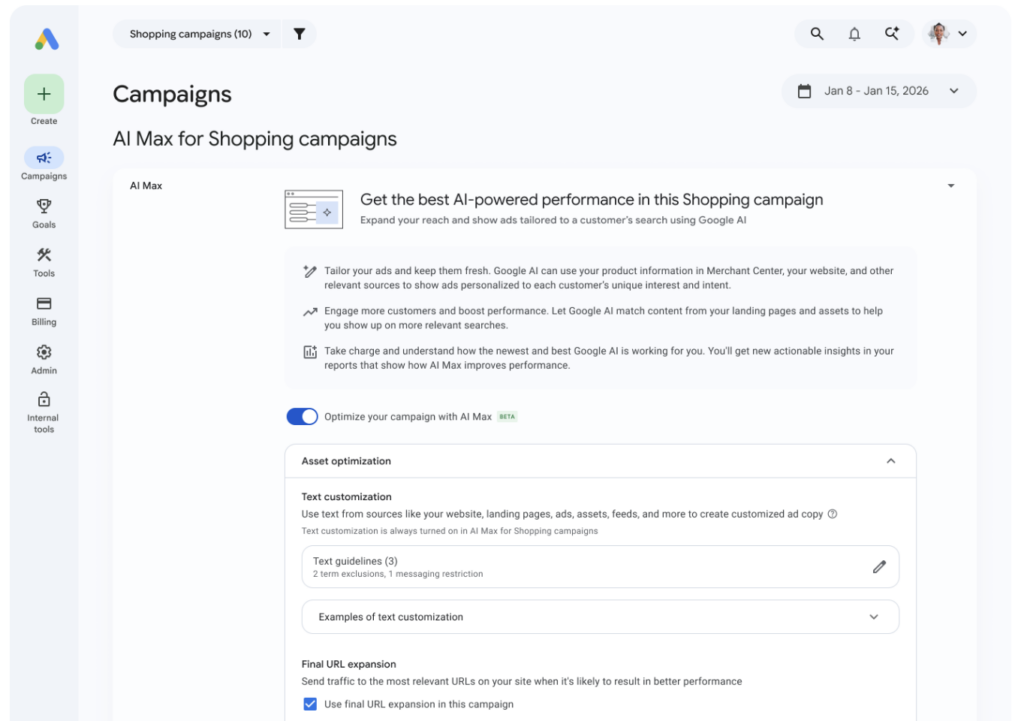
- The cool feature (Text Customization): Generative AI will now write ad copy for your Shopping ads based on your feed attributes, rather than relying strictly on static product titles. It’s a win-win that boosts relevance and CTR. But here’s the catch: You cannot fake Data Density. If your feed is messy, your AI-generated copy will be garbage.
- The trojan horse (Final URL Expansion): Google takes the wheel by dynamically selecting landing pages based on what the AI assumes is the user’s intent.
- The format hijack (Format Selection): This is the functional layer that executes URL expansion. If the AI decides a category page is more relevant than a product page, it will serve a text ad instead of a Shopping ad.
In other words: Your Shopping campaign is now also a Search campaign.
Who is this actually for?
Google is effectively blurring the lines even further between campaign types that now fundamentally do pretty much the same thing in slightly different ways.
Is this a good thing?
To be frank: We don’t know … yet.
The theoretical advantage here is catching keywordless traffic you might have otherwise left on the table.
But in the age of Broad Match Search and full-suite PMax campaigns, those queries are likely already covered. Google is simply increasing the overlap and redundancy within their campaign stack.
At the moment, this feature-release feels more like a defeated acknowledgement that there will always be a small percentage of advertisers who will never transition over to PMax.
So who is this exciting for? If you only use standard Shopping and Exact Match Search, this is a massive upgrade. For everyone else, it warrants a big shrug.
CHECKLIST: How to test it (without killing your setup)
If you feel like this feature fits into your strategy, test it cautiously:
- Turn on text customization in a controlled test. Pick a defined segment — a category, a margin tier, or a campaign — and measure CTR and conversion lift against a clean baseline. The upside-to-risk ratio is the strongest of the three features and the easiest to attribute.
- Hold Final URL expansion and Format Selection back until you’ve mapped the overlap. Before turning either on, write down where the new Search-style traffic would actually land, and which existing campaign would lose attribution to it. If you can’t answer that on one page, you’re not ready to enable them.
- Audit your campaign overlap before any rollout. If you already run PMax, broad match Search, and DSAs, the harder question isn’t “will AI Max for Shopping add revenue?” It’s “where would it add incremental revenue, and where would it just cannibalize another campaign in the same account?”
- Treat defaults as a starting point, not a recommendation. Google’s stack is converging. Default-on settings will increasingly favor platform reach over advertiser control. That’s not a bad thing in every case — but it’s almost never the right answer at face value for advertisers with mature setups.
Either way: We highly suggest not diving head first into a new feature until you are 100% sure it fits your bill.
Because the market is pretty darn tough right now, and any strategic switch demands 100% clarity on the macro-economic realities you are facing at the moment.
Don’t let Google’s default settings dictate your ad spend in a tough market.
Let our team of Google Ads experts review your account to help you navigate the AI Max transition and see exactly where these features fit into your strategy—and where they might just get in the way.
source on Google →