Subscribe to join thousands of other ecommerce experts
Article updated 2026-01-15, 4:32pm.
There are 4 ways to set up Performance Max, ranging from basic to advanced. The most effective strategy—often referred to as Campaign Orchestration—moves beyond static campaign structures. Instead of manually grouping products by categories or fixed margins, this approach treats your inventory as a fluid ecosystem. It uses Dynamic Segments to automatically shift products between different campaigns and budget pools in real-time based on live signals (such as stock pressure, competitive price changes, or contribution margin), ensuring your ad spend always aligns with your current business reality rather than yesterday's goals.
What? Another “How to PMax” article? Yes, but this one’s the most comprehensive you’ll read yet!
In 2025 alone, we’ve set up over 1000 campaigns for our clients. Refining PMax optimization techniques to drive profitable ecommerce growth.
This article isn’t just a guide; it’s a look inside how to steer the AI for maximum impact. So let’s break it down:
Table of Contents
“Should I use Performance Max in 2026?”
Yes. Performance Max has come a long way since its inception in 2022. Google has introduced several new and highly useful reporting and control levers that make it the most powerful Google Ads solution available today. It is unsurpassed in its capability to grow revenue and reach customers across the entire Google inventory.
However, not everything is perfect. While it is no longer fair to call it a Black Box, it still lacks several critical control mechanisms available in Standard Shopping that make setting it up a bit of a head-scratcher. Its highly automated nature means that it doesn’t offer you item-level control out of the box.
That being said, and as you will see in this guide, you can absolutely give it the necessary data boost to regain that control. In that way, PMax has become a mirror. A mirror for your capabilities to steer Google’s algorithm. It reflects the data you feed it. If you learn to master it, you can have almost the same control you love from Standard Shopping, coupled with Performance Max’s outstanding reach.

Does creating more PMax campaigns improve control?
Contrary to popular belief, creating more campaigns often reduces control by diluting data density. Our analysis shows that spreading conversion data across too many granular campaigns prevents the algorithm from learning effectively, often resulting in lower tROAS outcomes. True control in PMax optimization comes not from maximizing the number of campaigns, but from building smart structures that balance segmentation with sufficient data volume per campaign.
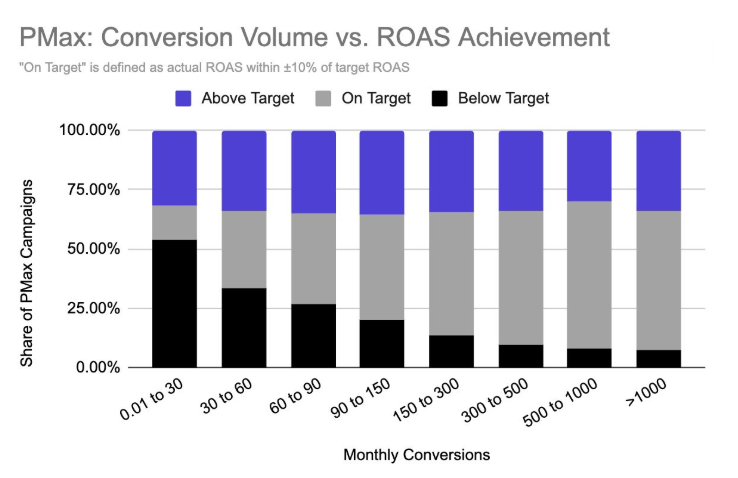
Take a look at the underperforming sections of the bars above: campaigns with insufficient data struggle to hit their targets. You’ll basically hand all your control over to PMax and have no control over which products are served, nor where and how aggressively. Do you really want this?
The key takeaway? When it comes to PMax optimization, success isn’t about creating more campaigns but building smarter structures that balance data density with segmentation.
What are the best PMax campaign structures for 2026?
The most effective PMax structures for 2026 range from basic setups to advanced Dynamic Segments. While entry-level strategies rely on single campaigns or static margin-based clusters, the optimal approach uses Campaign Orchestration to move products dynamically based on real-time business context like inventory and predicted profitability.
We’ve identified four common approaches to structuring PMax campaigns, ranging from entry-level setups to advanced, data-driven strategies.
Whether you’re just starting out or looking to refine your current setup, understanding these methods can help you unlock the full potential of PMax:
Worst case: 1 Campaign = Black Box
This is Google’s favorite starting point for PMax optimization: one full-funnel campaign where you set a budget, add a tROAS, and sit back. It’s simple and gets you running, but here’s the catch—it doesn’t take your unique business needs into account.
Google optimizes auction by auction using only the data it can see. This often means a handful of overachieving products dominate the ad spend and revenue. If one of those “heroes” goes out of stock, your performance might nosedive.
When this approach works for you:
- You’re new to PMax optimization and want to gather first learnings.
- Your product catalog is small and straightforward.
If you have large catalogs, and/or focus on long-term growth, this is just a stepping stone.
Bad case: 1-Dimensional Segmentation
This setup is where PMax optimization can go off the rails. Segmenting products by a single attribute, like margins or historical performance, sounds smart but often creates more problems than it solves.
We understand under a 1-dimensional segmentation two different scenarios:
- Campaigns that are built based on 1 attribute in the feed (eg high-mid-low margin)
- Campaigns that just use 1 item ID’s performance snapshots to cluster products (you’ll later see a 2-d matrix which we still consider as 1d segmentation 🤯)
Let’s keep in mind, that we’d like to steer the AI in a profitable way and you might wonder why a campaign setup of putting products with similar margins together, has just little to do with profitability?
#1: Campaigns built on 1 attribute in the feed
With most of the retailers we’ve analysed (eg by adjusting the pixel with conversions with cart data), we noticed that approx. 50% of the products that have been clicked, were either not purchased at all or were bought alongside some other products.
Meaning, the margin of clicked products is in most of the cases something completely different than the actual basket margin. If you’re now pushing products with high margins (which are – let’s be honest – often not THE most attractive products in your assortment), it will simply lead to more clicks on these products.
What happens later in the shop is totally out of the hand of a PPC campaign.
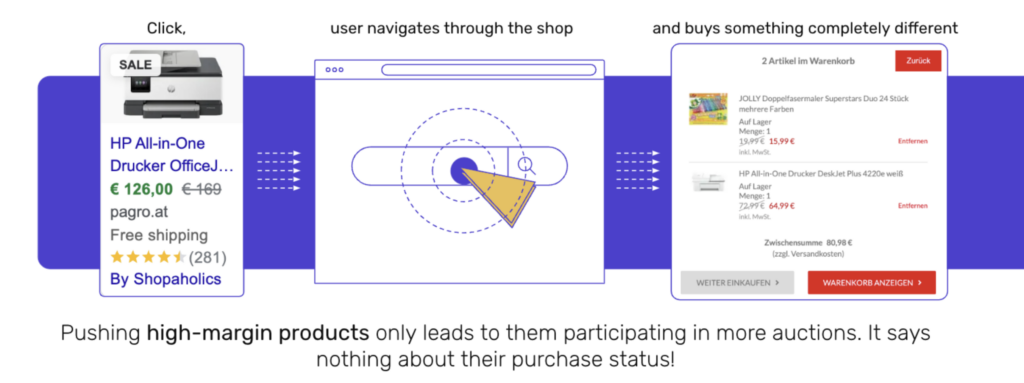
And here’s yet another issue: just because you cluster products based on margin doesn’t mean those products are in demand, relevant, or in season. Ecommerce success isn’t driven by a single metric—it’s influenced by consumer behavior, market trends, seasonality, and inventory dynamics.
A 1-dimensional view neglects these complexities, leading to campaigns that fail to resonate with shoppers.
#2: Campaigns with 1 item ID snapshot:
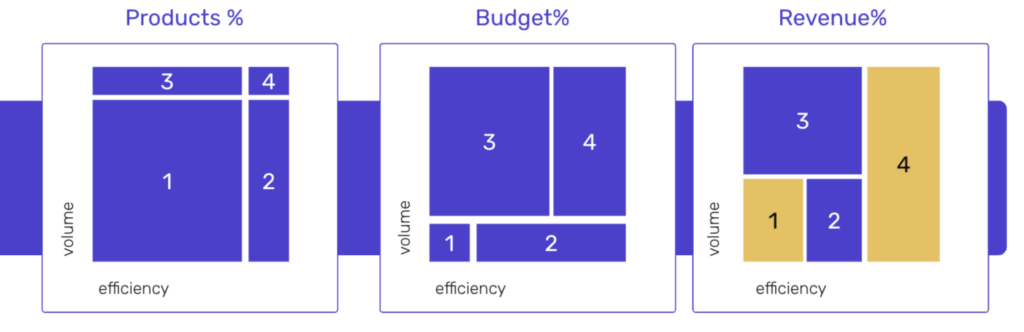
The other 1-d segmentation possibilities are frameworks where you cluster products based on their volume and efficiency, often by scripts.
You define a threshold for which you’d think that the product is high/low in efficiency and high/low in volume and end up with 4 different groups.
This leads to 80-90% of products with little data ending up in campaign #1, 1-3% in campaign #4, which then receive a disproportionately high/low budget and leave the long-tail products to their fate.
When this approach works for you:
- You’re focusing on short-term ROAS over strategic growth.
- Your PMax optimization process lacks access to more nuanced data.
If that sounds limiting, it’s because it is. So let’s make it smarter:
Ok case: PMax scoring based on Business Data
Here, PMax optimization starts getting smarter. But why do we even need business data in the campaign structure? Well, there are simply some metrics that are more important for customers, Heads of Ecommerce or CFOs, or Google Ads than others. This means it’s our job as PPC managers to steer the AI in the right direction.
Step 1:
So, think about the nature of your business and add relevant data into your Data Feed using Custom Labels:
- What USPs do your customers value?
- Which metrics are brought up by your colleagues in controlling?
- What does Google Ads say about previous performance?
Think gross margin, stock availability, or seasonal demand—all factors that matter in ecommerce but aren’t visible to the algorithm.
Step 2:
Next, you’ll need the data in a (Google) spreadsheet, to define the weighting. Each of your products receive a numeric score and you may then send this information by to Google in order to create a custom label in the Merchant Center. You can use these custom labels when creating PMax campaigns and their listing groups in Google Ads.

If you run this script once per day and add some fallback logic to it, this approach can provide a temporary boost by feeding the AI more business-relevant information at the product level.
However, let’s not sugarcoat it: refreshing data for thousands of products daily is a grueling task that’s prone to errors. It’s a manual, time-intensive process that could break under the weight of scaling.
At some point, you’ll inevitably hit a wall—not just with spreadsheet limits but with the effort required to keep the data accurate and up-to-date. Expanding beyond the constraints of 4 custom labels or incorporating additional metrics becomes an uphill battle.
When this approach works for you:
- You have a team familiar with data tools and scripting.
- You’ve started integrating business metrics into your PMax campaigns.
This approach might work as a stopgap, but it’s far from a robust or sustainable solution for businesses with larger catalogs or long-term goals.
Best Case: Campaign Orchestration
The pinnacle of PMax optimization isn’t just about segmenting; it’s about Orchestration.
The technical reality of PMax is that static segments are obsolete the moment they are uploaded. Inventory levels fluctuate, competitors adjust pricing, and demand curves shift hourly. To truly steer the AI, you must architect a setup where products move themselves.
This requires moving beyond simple feed attributes to Campaign Orchestration—a multi-dimensional system that scores products in real-time. Here is how the technical architecture works:
Step 1: The unified data layer
You cannot segment based on data you don’t have. The first step is aggregating disparate data sources into a single “Master Feed” layer. This goes beyond the Merchant Center. You need to merge:
- ERP data: Real-time stock depth, return rates per SKU, and Contribution Margins (not just COGS).
- Competitor intelligence: Price gaps (e.g., “Am I cheaper than Amazon?”).
- Google Ads data: Historical conversion rates and impression share lost (budget).
Step 2: The multi-dimensional scoring model
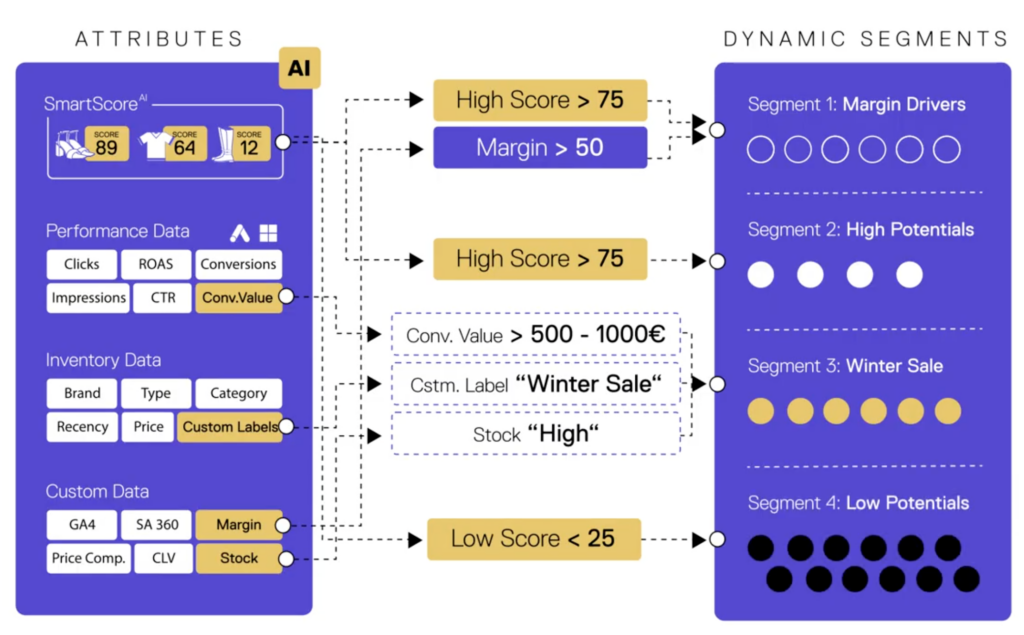
Instead of a binary “High Margin” flag, you calculate a weighted index for every Item ID. This is where Multi-Dimensional Segmentation happens. You create a formula that weighs your strategic priorities.
- Example: Product Score = (Gross Margin % * X) + (Stock Velocity * X) + (Price Competitiveness * X)
This generates a dynamic score (e.g., 1 to 100) for every single product. Ideally updated daily or even hourly.
Step 3: Dynamic Custom Label injection
This score is then mapped to Custom Labels in your Merchant Center feed via API.
- Score 80-100 → Label 0: “Margin Drivers” (High Margin, High Stock, Competitive Price)
- Score 50-79 → Label 0: “High Potential” (Good Margin, Needs visibility)
- Score 0-49 → Label 0: “Low Potential” (Low Margin, High Return Rate)
Step 4: The campaign matrix
In Google Ads, you need to build listing groups targeting these specific labels. The magic happens in the loop: As a product’s stock drops or margin improves, its score changes. The API updates the Custom Label.
The product automatically leaves the “Low Potential” campaign and enters the “Margin Drivers” campaign, inheriting a higher budget and aggressive tROAS target instantly.
The technical hurdle: Don’t try this in Excel
On paper, this architecture is flawless. In practice, building this “DIY” is nearly impossible for most in-house teams. Why? Because maintaining a live connection between your ERP, your pricing tool, and the Content API for Shopping requires enterprise-grade engineering.
Calculating complex scores for 50,000 SKUs and pushing updates every hour hits API rate limits, causes version control nightmares, and creates a massive maintenance debt.
The solution: Specialized PPC-tech
This is why Campaign Orchestration requires specialized infrastructure. Tools like the smec Campaign Orchestrator are built to handle this heavy lifting—integrating the data, calculating the predictive scores (using SmartScoreAI), and automating the API pushes.
So you can focus on the strategy, not the script maintenance.
When this approach works for you:
- You’re ready to invest in advanced tools or partner with experts who specialize in PMax optimization.
- You want to unlock the full potential of your campaigns through data-driven strategies.
- You want your campaigns to reflect profit and strategy, not just revenue.
PMax optimization: What’s Next?
PMax optimization isn’t just about setting up campaigns—it’s about constantly improving them. The most successful advertisers focus on feeding PMax with superior data, strategically guiding the algorithm, and refining their approach over time.
At smec, we specialize in turning PMax into a growth engine. From dynamic, multi-dimensional segmentation to predictive budget allocation, we help ecommerce businesses unlock new opportunities and achieve sustainable success.
Ready to master PMax?
Don’t let your campaigns settle for average. Schedule a call with our experts today and discover how smarter strategies and data-driven insights can drive your business forward.
Let’s transform your challenges into growth opportunities.

source on Google →