Subscribe to join thousands of other ecommerce experts
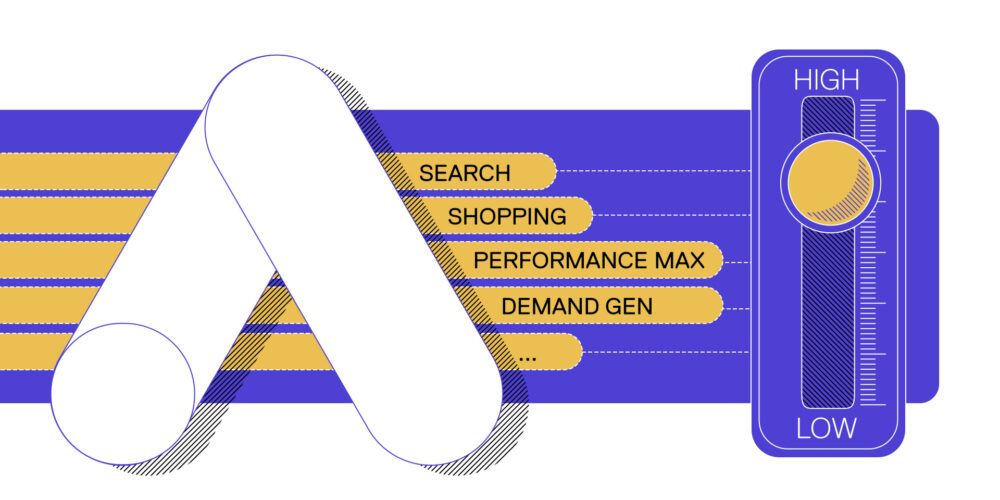
Google Ads channel prioritization lets you set channels to high or low priority in Search, Shopping, Performance Max and Demand Gen campaigns and, except in Demand Gen, cap how much of the daily budget a low-priority channel can spend. Priority shifts spend only for some bid strategies, while the cap applies whatever the strategy. smec’s view: the cap does the real work, and Search campaigns with Display expansion need a decision before February 2027.
Google announced channel prioritization and budget allocation on 14 October 2026 and is rolling it out over the coming months. You set it at account, shared budget or campaign level in Google Ads or Search Ads 360, but not from a manager account. API and Editor support is coming soon. If you run Search campaigns with Display expansion on, or want Performance Max to spend less on Display, this one’s for you.
▶ Prefer to watch? Mike Ryan and Chris Scharmüller break down channel prioritization in Growing Ecommerce EP59
| Campaign type | Channels you can set to high or low | Budget cap on low-priority channels? | Realistically worth setting to low |
|---|---|---|---|
| Search | Google Search, Search partners, Google Display Network | Yes | Display Network, Search partners |
| Shopping | Google Search, Search partners | Yes | Search partners |
| Performance Max | Google channels, Search partners, Google Display Network | Yes | Display Network, Search partners |
| Demand Gen | Google channels, Google Display Network | No | Display Network (priority only) |
“Google channels” is one bundle: Search, YouTube, Maps, Gmail and Discover. The last column is smec’s assessment.
Table of Contents
How does low priority work in Google Ads?
Where priority applies, it works like a waterfall: Google spends your budget on high-priority channels first, within your target, and only moves what’s left to low-priority channels. Every channel starts at high priority. Nothing changes until you change it.
Think of it as Google’s third way. Not opted in, not opted out. Just second in line.
“They want a third option, which is instead of saying, no, I don’t want to appear on search partners at all, you say, I want it to be less prominent.”
— Mike Ryan, Head of Ecommerce Insights, smec
“Google is going to find as much revenue and conversions as they can at your efficiency level. And when they hit that point, then they will look at this next channel. So it’s really a sequencing thing. It really makes it a kind of a second-class citizen.”
— Mike Ryan, Head of Ecommerce Insights, smec
How much the waterfall matters depends on your bid strategy. With Maximize Conversions, Maximize Conversion Value, Maximize Clicks, Manual CPC or Target Impression Share, high-priority channels always spend your budget first. With Target CPA, Target ROAS or Target CPC, priority only moves money when the campaign is limited by budget. Otherwise, Google’s help page says, channel prioritization doesn’t change how the budget is spent.
What does the budget allocation cap do?
The budget allocation cap sets the maximum share of a campaign’s average daily budget that a low-priority channel can spend. You can only use it after setting the channel to low priority. And you can take it all the way to zero.
“And you can slide that all the way down to zero, which functions like a checkbox.”
— Mike Ryan, Head of Ecommerce Insights, smec
The rules, per Google’s documentation:
- The percentage is calculated on the average daily budget, not on actual spend. 5% of a $1,000 average daily budget targets $50 a day.
- The cap resets daily. Unspent or overspent amounts don’t carry over.
- It is best effort, not a hard limit. Spend on that channel can occasionally go over.
- 0% stops spend on that channel.
- It applies even to target-based campaigns that aren’t limited by budget.
- It is not available for Demand Gen campaigns.
Three setup limits to know:
- Campaign total budgets: channel prioritization only works with them in Demand Gen.
- Shared budgets: every campaign on the shared budget must be the same campaign type. The settings then apply to the shared budget as one pool.
- Experiments: supported in custom experiments, but not with multi-campaign shared budgets.
Does channel priority add anything Google wasn’t already doing?
On its own, not much. Google already says it chases the most valuable conversion first and only then looks elsewhere. Chris asked the obvious question on the show:
They are always going for the best conversion in the best channel, and only after that they are looking at the next incremental conversion, maybe in another channel. So what’s the value add?
Chris Scharmüller, CCO, smec
Our answer: for target-based campaigns that aren’t limited by budget, priority alone changes very little, and Google’s own documentation says so. The cap is the part that matters. It gives you a percentage limit on Display and Search partners, down to 0%, whether or not your campaign is limited by budget.
Why can’t you deprioritize YouTube in Performance Max?
You can’t deprioritize YouTube in Performance Max because Google groups Search, YouTube, Maps, Gmail and Discover into one “Google channels” bucket. Set that bucket to low and you deprioritize Search and Shopping too, which is where most retail campaigns make their money.
“If it would be Google Search Network and then Google owned and operated, okay, makes sense. But how do you want to deprioritize Google Channels?”
— Chris Scharmüller, CCO, smec
So in Performance Max, the only channels worth setting to low are the Display Network and Search partners. In Demand Gen, only the Display Network. Need control over YouTube itself? Google points to Search and Demand Gen campaigns, which let you opt out of each supported channel individually.
What changes for Display expansion in February 2027?
Display expansion is the one setting to act on now. Today, Search campaigns with Display expansion run on a fixed 50% budget split that Google applies in the background. You can’t see it, and you can’t change it. From February 2027 that setup goes away, and Google says your spend may shift between Google Search, Search partners and the Display Network.
New settings default to high priority. So once the old setup is gone, Display could take more of your Search budget than it does today.
“It’s going to become by default more active. So you want to go in and set it, because, you know, if even Google set it as a low priority channel, you know what? You probably want to set it to low priority.”
— Mike Ryan, Head of Ecommerce Insights, smec
What to do before February:
- List every Search campaign with Display expansion switched on.
- Set the Google Display Network to low priority with a 50% budget allocation to keep today’s behaviour. Google’s help page names this exact setting. If Display isn’t earning its share, go lower.
- Check campaigns that use Target Impression Share bidding. From February 2027, the Display Network stops serving on them.
Settings you make before February take effect immediately.
Is Google Ads getting too complicated to control?
Channel controls now come in four forms, and each campaign type has its own mix:
- opt-outs for Search partners and Display in Search
- channel checkboxes in Demand Gen
- channel sliders in Performance Max, still in alpha
- priority levels and budget caps across all four campaign types
The Performance Max sliders work differently from the new priority setting. A slider reprices a channel rather than switching it off: moving it up relaxes that channel’s CPA target, moving it down tightens it. Neither gives you a hard on/off switch for YouTube inside Performance Max.
Google is meeting advertisers halfway, and it shows.
“The market is demanding more control… So they’re finding something that offers some measure of control but is not going to completely turn off the channels.”
— Mike Ryan, Head of Ecommerce Insights, smec
“I don’t want to be the whining guy here. I think that it makes sense what Google has done here, but it’s just complicated.”
— Mike Ryan, Head of Ecommerce Insights, smec
Our take: the black-box era is over. What holds advertisers back now is know-how, not access to controls. If you know which lever actually moves spend, and which one only looks like it does, you’ll get more out of the same budget than someone flipping every switch.
Key takeaways
- Google Ads channel prioritization (announced 14 October 2026) lets you set channels to high or low priority in Search, Shopping, Performance Max and Demand Gen campaigns.
- Where priority applies, high-priority channels spend first and low-priority channels get what’s left. That covers Maximize Conversions, Maximize Conversion Value, Maximize Clicks, Manual CPC, Target Impression Share, and target strategies that are limited by budget.
- For Target CPA, Target ROAS and Target CPC campaigns that aren’t limited by budget, priority alone doesn’t change where spend goes. The budget cap does.
- The budget cap is a best-effort percentage of average daily budget, set only on low-priority channels. 0% stops spend, and the cap isn’t available in Demand Gen.
- In Performance Max and Demand Gen, Search, YouTube, Maps, Gmail and Discover are bundled as “Google channels”, so in practice only Display and Search partners are worth setting to low.
- In February 2027, Display expansion in Search campaigns loses its fixed 50% split. To keep today’s behaviour, set the Display Network to low priority with a 50% allocation.
Watch the full conversation

In Growing Ecommerce EP59, Mike Ryan and Chris Scharmüller unpack Google’s new channel controls and explain why Display expansion needs your attention before February. They also tell a true Halloween story: a client’s Google Ads account was hacked late one Thursday night and recovered the same evening.
For the Performance Max channel sliders that came before this update, see our earlier episode: PMax Channel Controls: What the New Sliders Do to Your Budget.
FAQ
Channel prioritization is a Google Ads setting, announced in October 2026, that lets you mark channels as high or low priority in Search, Shopping, Performance Max and Demand Gen campaigns. Where priority applies, low-priority channels only get budget after high-priority ones, and outside Demand Gen you can cap their share of the daily budget. Every channel starts at high priority.
Yes, in practice. Set the Google Display Network to low priority in the Performance Max campaign, then set its budget allocation to 0%. Google’s documentation says 0% means no spend on that channel. The cap is best effort, so check the channel report after the change.
Usually not. Google says that for Target CPA, Target ROAS and Target CPC campaigns that aren’t limited by budget, channel prioritization doesn’t change how the budget is spent. A budget allocation cap on a low-priority channel still applies to those campaigns, so the cap is the setting that moves spend.
If Display expansion is on, set the Google Display Network to low priority with a 50% budget allocation. That keeps the split Google applies in the background today. Also check campaigns that use Target Impression Share bidding: from February 2027, Display stops serving on them.
In Performance Max and Demand Gen, Google bundles Search, YouTube, Maps, Gmail and Discover into one “Google channels” group. Deprioritizing that group deprioritizes Search and Shopping too. For control over individual surfaces, use Search or Demand Gen campaigns.
Want the next Google Ads change explained
before it hits your account?
Growing Ecommerce, with Mike Ryan and Chris Scharmüller, brings you a new episode every two weeks.
[Subscribe on YouTube] · [Get the smec newsletter]

source on Google →